Mac workflows · Measurement and takeoff
PDF takeoff on a Mac: from drawing scale to an export you can use
A useful PDF takeoff connects each quantity to the drawing that produced it. On a Mac, the workflow is straightforward: confirm the source issue, calibrate a known dimension, measure the required scope and export a record with clear units. This guide follows that process using OpenBeam’s early-access measurement and markup tools.
- Calibrate from a known dimension and verify the result before measuring the package.
- Keep different drawing scales, quantity types and units clearly separated.
- Export the measurement record, then prepare quantities for your estimating spreadsheet.
Decide what you need to measure
Start with one defined scope: a pipe run, a floor finish, an enclosure perimeter or a set of fixtures. Record the drawing number, revision and relevant specification before tracing anything. A quantity becomes difficult to check when the measurement is detached from the material, location or issue it represents.
Use separate working copies for takeoff and retain the issued PDFs unchanged. If a package includes plans at different scales, separate those sources before measuring. Check whether enlarged details, schedules or a newer revision change the scope you intended to count.
| Quantity | Drawing task | Record alongside the result |
|---|---|---|
| Length | Trace a run or measure between defined endpoints. | Route, material, unit and whether vertical lengths are included. |
| Area | Trace the boundary of the surface being measured. | Finish or element, unit and treatment of openings. |
| Perimeter | Follow the closed boundary of an element. | Which edges are included and which deductions apply. |
| Count | Mark each instance of the item being counted. | Item type, location and the scope of the count. |
Calibrate a known dimension in OpenBeam
Open the working PDF and choose Measure → Calibrate Scale. Draw a line along a dimension whose real length is known, then enter that length and its unit. Use endpoints you can identify precisely on the drawing. A printed scale ratio is useful context, but an exported or resized PDF still needs a check against a known dimension.
Measure a second known dimension to check the calibration before continuing. If it disagrees, inspect the endpoints, unit, page scaling and source quality. Changing zoom should help place the points accurately; it does not replace calibration.
In the current OpenBeam early-access workflow, changing calibration also updates existing measurements in the open document. Keep sources with different scales in separate working documents, and check the existing measurements after any calibration change.
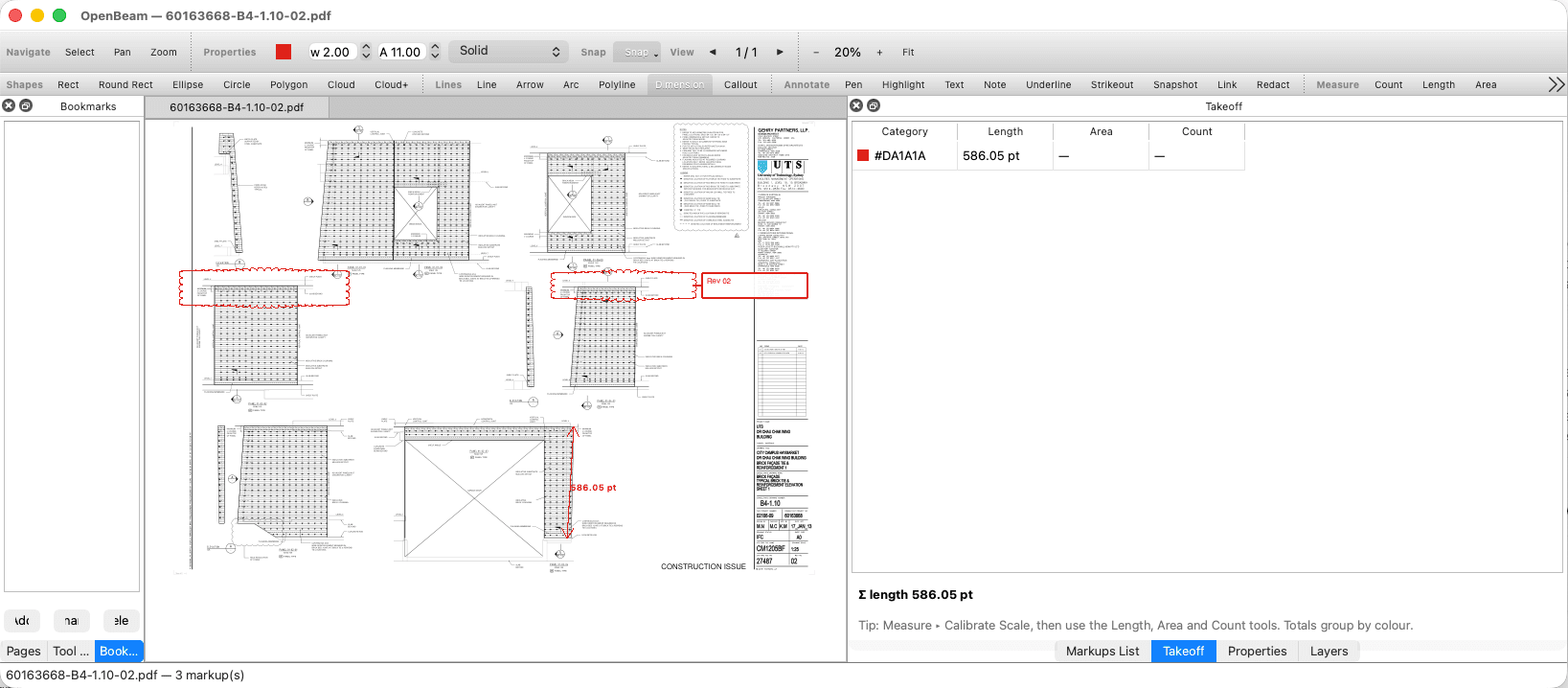
Measure the scope and make the labels useful
Use the Length, Area, Perimeter or Count tool that matches the task. For an area, follow the intended boundary and check what should be excluded. For a count, place markers systematically so another reviewer can distinguish counted items from items outside the scope. Return to the specification where the drawing alone does not establish what belongs in the quantity.
Assign a meaningful measurement category or subject, such as a material and location. OpenBeam’s Takeoff panel groups measurement records by category when supplied, otherwise by colour. Keep units consistent within a group and review the individual marks as well as the running totals.
A drawing quantity is one input to an estimate. Record allowances for waste, laps, vertical runs or other scope separately in the estimating record, with an explanation. This preserves a route back to what was actually measured on the sheet.
Export the measurement record to Excel or CSV
Choose File → Export / Convert → Markups → Excel or Markups → CSV. The current export writes one row per markup. Fields include page, type, colour, author, subject, comment, status, measurement and creation time. Keep the export with the marked PDF and the drawing issue details.
The Measurement field contains a formatted label, which may include a unit or additional measurement information. In the estimating workbook, place the verified numeric quantity and its unit in separate columns before calculating totals or applying rates. Retain the original export so this preparation can be checked.
Check a sample of exported rows against their source marks, then reconcile the scope as a whole. Filter out review notes that are not takeoff quantities and inspect repeated or overlapping measurements. Add the document number and revision to the handover record; a PDF page number alone is not a drawing identity.
Revisit quantities when the drawing changes
Preserve the earlier takeoff and establish which sheets the new issue replaces. Compare the revisions, locate changes that affect the measured scope and reassess those quantities using the same measurement rules. Keep an explanation of each material change beside the revised estimate.
A visible drawing difference can be a design change, a plotting change or a scan-alignment problem. Inspect it against the sources before treating it as additional or omitted work. The comparison guide covers matching sheets, alignment and a reviewable change record.
Try one complete handover before choosing a tool
Evaluate the process on a representative drawing: calibrate it, create the required measurements, save the PDF and export the markup record. Reopen both files and ask the person who receives your quantities whether the result gives them the information they need.
OpenBeam is available as a 12-week early-access trial for macOS 13 or later on Apple Silicon and Intel Macs. The product page shows the current interface, supported workflows and release scope. Discuss your document types and handover requirements with Newport Resonance if you need help assessing fit.
Before handing over the takeoff
- Drawing identity, revision and measured scope are recorded.
- Calibration has been checked against a second known dimension.
- Different scales and units are separated and any calibration changes reviewed.
- Measurement subjects identify the material or location being quantified.
- Source quantities and estimating allowances remain distinguishable.
- The marked PDF and Excel or CSV record have been reopened and reconciled.
OpenBeam for Mac
Measure, mark up and review engineering PDFs, then export a record for the next person in the workflow. Explore the current OpenBeam early-access trial.